Category Archives: April A-Z Challenge
N is for… (#AtoZChallenge 2012)
N is for Names
(Post 14 on my WIP)
I mentioned in my L post that Scrivener has a name generator that I haven’t used yet. I have used baby name books in the past though (and kept back a few for the real thing if/when it happens).
I currently have about 30 named characters in my novel and I can’t really remember how I came up with many of their names but oddly I think they fit and I wouldn’t want to change them now. So Shakespeare I’m just not sure if I agree with you.

I’m just going to highlight a few of them now.
I chose Jane Thomas as a plain ordinary name even though she is the heroine of the book. I think I wanted to highlight that anyone can be placed in an extraordinary situation and also (considering my M post) that anyone can experience mental health conditions.
I already mentioned naming the Forensics teacher after two of my friends and another few friends’ or friends’ kids’ names have slipped in the book, sometimes just because I love the name but often by virtue of a name check. I’ve still got a few to get in maybe, though it would seem odd to have them all as main characters, and in some respects would destroy the world building a bit (if you don’t end up named in this one I am hoping this will be a series, plus you’ll be in the dedication).
Skye (who you’ve yet to meet) is a name I just really like (a shortened version of Skylar). When I decided her character was a bit of a hippy her surname popped up and Skye Rain was born.
The biggest name related comment that came back from the beta-readers was about the Commander’s surname being Trainer and him being, well, a trainer. The Academy is set on a block named after him ‘Trainer’s Place’ and I just can’t let go of it. I know it maybe seems a bit cheesy but I find it hard to hear him have any other name. I guess another thing is because Jane doesn’t take his name it almost makes it hurt twice as much that it starts with the same initial.
It’s not just people that get named but places and things. There’s a club called The Rainbow Room, a hamster called Schwartz and some medication named after Ian Rankin (because randomly I’d just started following him on Twitter and his name stuck in my head). So one of the drugs Jane takes to control her mania is called Rankinex!
The other name thing I want to mention is pen names. Am I odd in wanting to use my own birth name? Even if I’m married by the time I publish it (you never know miracles might happen)? I could use my twitter/blog handle but that would just be odd!
How do you come up with your names (character or pen)?
Do you find the same ones popping up in different stories that you’ve written? (I have a Skylar and the surname Trainer in a short story that I sent off at the same time as my Novel sample).
Have you ever been made to change a character’s name and how did you handle that?
In preparation for Thursday’s Q post I’m asking for your questions here.

Share this on Facebook, Twitter and Google+

M is for… (#AtoZChallenge 2012)
M is for Manic Depression (Bipolar Disorder)
(Post 13 on my WIP)
I obviously can’t stop letting my day job (as an Occupational Therapist) creep into my writing. My main character Jane has Bipolar Disorder, which is more colloquially known as Manic Depression. This is a psychiatric condition that results in severe shifts in mood, from depressive lows to manic highs.
My hope is to present this condition in the book in a balanced way. For Jane it is not her ‘defining feature’ but just another part of her and, in fiction terms another barrier for her to overcome, but not an insurmountable one. One incident happens in the book that happened to Silver’s character in 90210 – I was really annoyed when I saw it because I’d already thought of the idea and obviously my version will now come later. Just goes to show there are no (or at least very few) truly original ideas in fiction.

The Time to Change campaign aims to end the stigma experienced by those with mental health conditions – why not show your support by Liking them on Facebook or by visiting their website to find out more. 1 in 4 of us is likely to experience some form of mental health problem at one point in our lives but we are still too scared to talk about it for fear of being seen and treated differently. Often those who have never experienced mental health conditions are also scared to talk about it because there is fear of the unknown. Will you pledge to at least start talking?
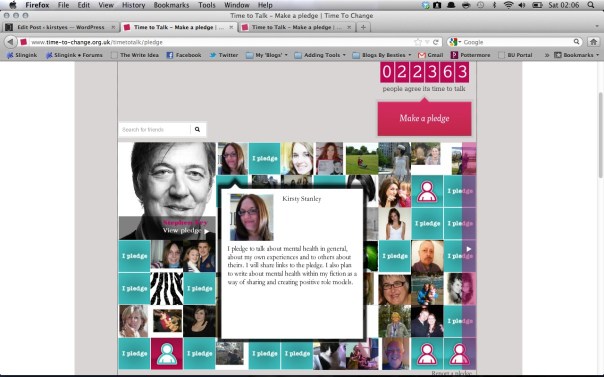
Writers and creative people in particular seem to, at least anecdotally, experience mental health problems frequently. I know I personally find it difficult to manage stress and have always been a very emotional person who tends to cry a lot (often when I am frustrated rather than always to do with low mood although some people struggle to understand this). I have felt judged at times when discussing this with others. One of the people on the Time to Change blog discusses the suggestion that people think you ‘can’t cope’. I also think that far too often in life people are pressurised to withdraw from stressful situations rather than the stressful situations being addressed and managed. There needs to be a balance between looking at the person and looking at the environmental aspects (as well as looking at occupations – but that discussion’s for another post).
To find out more about bipolar disorder why not start here at the Royal College of Psychiatrists website.
Do you think there are enough ‘positive’ portrayals of characters with mental health conditions in fiction?
Share this on Facebook, Twitter and Google+

L is for… (#AtoZChallenge 2012)
L is for Literature & Latte
(Post 12 on my WIP)

When I ‘won’ National Novel Writing Month in 2010 (for meeting my 50,000 word target) part of my prize was half price off Scrivener software. I decided to buy my MacBook Pro precisely so I could make use of this (please note they now have a Windows version released too so you don’t need to switch to Apple – I’m so glad I did though).
Scrivener is described as a content-generation tool for writers of many kinds; novelists, academics and students, screenwriters and many others. This wonderful software has been developed by Literature & Latte, a small company from Truro, Cornwall in the UK. Wanting a way to manage his own long text writing, Keith developed a tool that collates your writing, notes and research in one place. An online Binder (a term used in the software) which is much easier to sort through than lots of sheets of paper.

Here is how I have used Scrivener so far but I appreciate that I still have a lot to learn. There is a tutorial project within Scrivener that would be beneficial to work through as well as a guide to Scrivener. There are a number of videos on You Tube and within the forums on the Literature & Latte website on how to use the different features too. I also recommend the Kindle book ‘Writing a Novel with Scrivener’ by David Hewson – for writers it helps you identify the features that will be the most useful to you.

For My Novel
The Novel template comes in the following sections.
A guide to the template and how to use it (handy as a reminder).
The manuscript section which you split into chapter folders and have each scene as a page that you can drag and drop to rearrange the order as you’d like (this is very helpful when you don’t write in order).
The Character section where you can use a pre-made character sketch template (I hope to develop this further and create full background and personality sketches for my main characters)
The Places section where you can use a pre-made Setting sketch template (Helpful for consistency so you don’t suddenly have the kitchen coming straight off the hall if it didn’t three chapters ago).
The Front Matter section for different formatting (manuscript, e-book etc) including front covers and dedication pages.
The Research section for adding in links to websites, random notes and scribblings and any other random research (I love that you can import PDFs – will be very useful for my PhD – I’ve also set up a section to collate feedback from my Beta-Readers that I’ll be able to use when re-drafting).
Template sheets (which I copied up into Characters and Places but I assume you can make your own and add here too – I need to look into this).
The Trash section where you can send anything you don’t want active in your project but it remains ready to restore if you change your mind (unless you empty the Trash and then it goes forever).
For Poetry
You can use the Poetry template to gather your poems – moving them round by theme etc ready to make into a collection for printing.
For Sriptwriting
Again a number of templates are provided from film script, to comic to radio play. This is the function I have the most to learn about because you can use it to automatically function different aspects of your script (dialogue, scene headers etc) using drop down lists but I haven’t fully got my head round it yet.
For My Research (PhD) and Academic Writing
There are a number of different non-fiction templates from essay writing to research proposal and I am using them to gather my research and writing together for my PhD as well as to start planning any papers I want to write.
For My Teaching
I used the basic template to develop a handbook for my unit which I was able to provide in PDF and Kindle formats from within Scrivener.
For Blogging
I just used the basic template and set up folders and pages as needed for different memes (such as the A-Z Challenge, my Harry Potter tour series). etc.
Key Features you may like (I do)
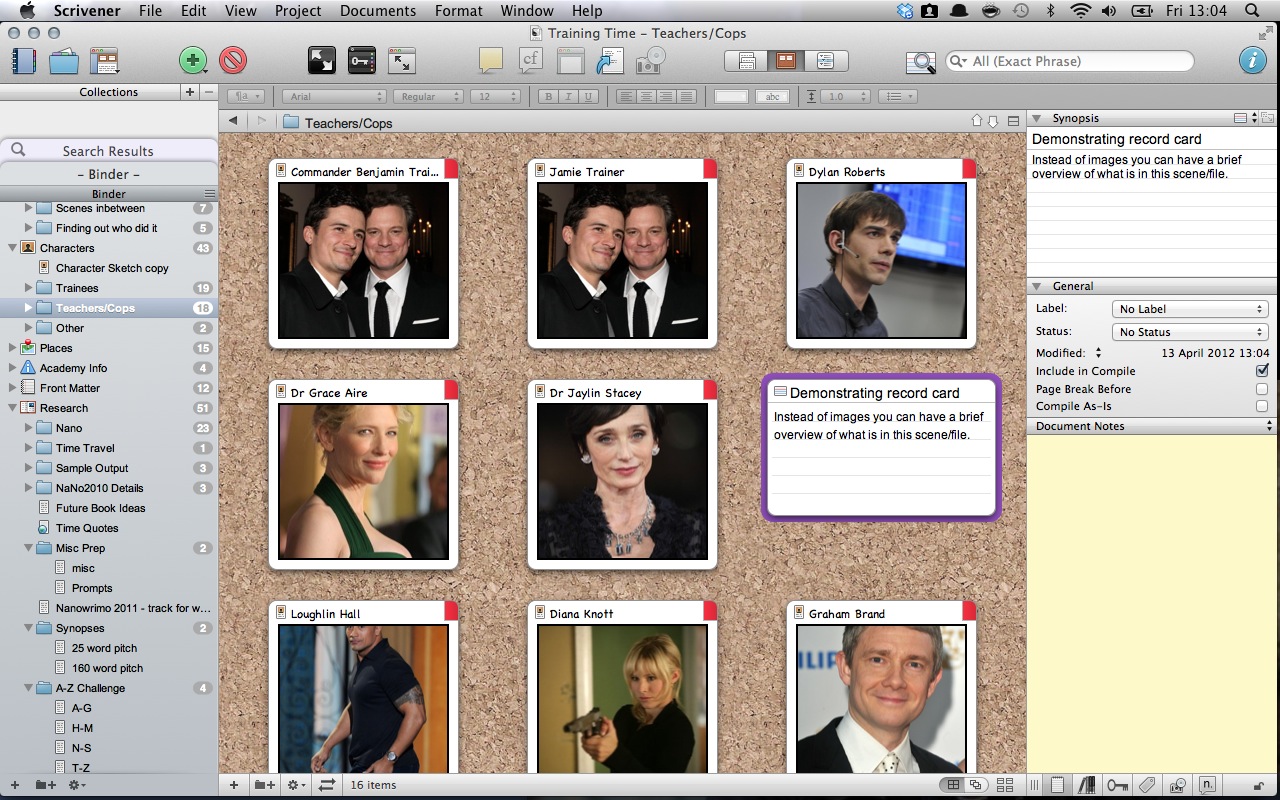
Corkboard
Each section or folder can be viewed as a corkboard with either record cards or images which makes it easy to get an overview of that particular selection and move things around (see image above).
Name Generator
Found under Edit – Writing Tools – if you are having a name blank Scrivener will conjure up a list of names to inspire you. I’ve not used it yet but can imagine it will be helpful for tertiary characters.
Search
If you want to find every scene with a particular character mentioned you can and that search is saved above the Binder.
Scrivenings
This means that you are able to view all of your separate documents (temporarily) as one continuous piece of text. They still remain where you put them originally.
Split screen
Want to be able to write a scene whilst referring to research you have gathered – no problem – just use the split screen mode which opens your research in either the top or bottom half of the screen, fully scrollable.
Split
Decided the scene you are writing is too long – don’t worry about cutting and pasting you can split the document in two at a point decided by you. Only discovered this today.
Full screen
If you are anything like me you are easily distracted, but Scrivener has a full screen mode so you can just concentrate on what you are writing and fade everything else to black. You can still access formatting tools by clicking and selecting from the list that appears.
Snapshots
Want to make a huge edit of a scene but don’t want to have to copy or lose the original version (just in case) – use Snapshots which save the original version which allows you to compare and contrast and see which you prefer.
Labels
Writing a novel with shifting points of view? You can label each scene based on whose POV it is meant to be written in. You can also assign different colour labels to remind yourself if this is a scene/character etc etc – set up as many as you want (I think you might only be able to add one per scene though but I’m not sure).
Notes and Comments
You can add in footnotes, comments, overall project notes – in fact you can pretty much scribble what ever you like to help you keep track of what you need to do, change etc. Use the little record cards to write summaries/POV etc too.
Integration with Dropbox
I used Preferences to set all my Scrivener projects to save to Dropbox. An extra back up in the cloud and this means that with some mobile apps (I’ve not explored any yet) you can access the raw files and edit on the move. Now I’m looking forward to the development of their native iOS app (which is in progress) so I can work with a familiar set up on my iPad.
Compile
Project finished and ready to go? Scrivener allows you to Compile the document (selecting only the pages you want) to a number of different formats, such as Kindle, PDF, Word etc.
…
I’m not sure I’ve really done this excellent tool justice because there is so much that it can do and I just haven’t learnt it all yet. The price is so reasonable (much less than Office) and you can have a free trial so why not go for it and have a play.
I just found this case study on the website that might come in handy for me as I’m hoping this will be book one of a series.
Using Scrivener to Manage Serial Novels With Monica McCarty.
…
So who else out there uses Scrivener? If not, what do you use instead?
Any more Scrivener hints and tips that you’d like to share?


 kirstyes